For Rainbow offices

What type of people can you hire if you run your business with outdated tools?

Your people aren’t necessarily the bottleneck. Your machinery might be.

Passing this along? The one-sheet (PDF) is one page, made for forwarding.

01 The old world

You know this Tuesday.

None of this is laziness. It’s capable people keeping in their heads what a phone should hold.

A lot of offices are running a 56k modem in a fiber-optic world.

  1. Spent an hour prepping to make fifteen minutes of calls. Call blocks you green-light
  2. Dug through a jacket pocket for the number from Saturday’s show. Photograph a handwritten lead; OCR reads it
  3. Hunted for the script. It was in a binder at the office. Scripts inside the call screen
  4. Promised a Thursday callback. Remembered it Saturday. Who to call next
  5. Spent five minutes on paperwork that should take fifteen seconds. Paperwork signed on the phone
  6. Sat through weeks of software training. Went back to paper. My Day: your whole day, one screen
  7. Said you’d go into the office tonight. Went home instead. The Rainbow office, on your phone.
  8. Watched a sharp new hire see the card piles and quit. A new dealer opens My Day and sees the next action

The cycle

  1. Outdated tools make frustrating work.
  2. Frustrating work drives off the ambitious ones.
  3. The owner becomes the bottleneck.
  4. Everything depends on the owner’s memory.
  5. Growth gets expensive and painful.

That’s not a people problem. It’s a card in a pocket and a script in a binder.

02 The shift

AQI Kai

The Rainbow office, on your phone.

Leads, calls, demos, service, paperwork and pay, on the phone your people already carry. Easy enough that it actually gets done.

The 55-second tour, with music. It waits for you to press play.

Bring the ambition. We’ll bring the leverage.

03 The real screens

Oh. It’s actually that easy?

Real screens from the app. The customers are fictional; the buttons are the ones you’d tap.

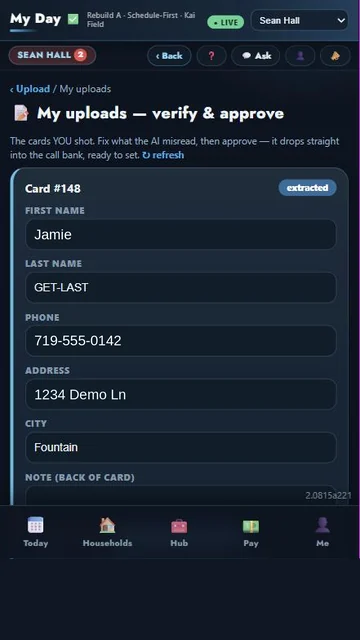
  1. Photo → OCR → Lead

    My uploads, verify and approve: card 148 read by OCR as Jamie, 719-555-0142, 1234 Demo Ln, Fountain

    Photograph the handwritten card. OCR fills in the name, phone and address. You check it against the photo and approve. Nobody retypes.
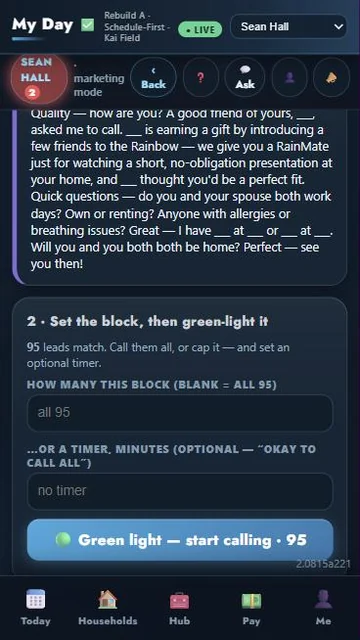
  2. Block → Green light

    Set the block, then green-light it: 95 leads match, an optional cap and timer, and a Green light, start calling button

    Set tonight’s block and see that 95 leads match. Call them all, or cap it and set a timer. Then green-light it.
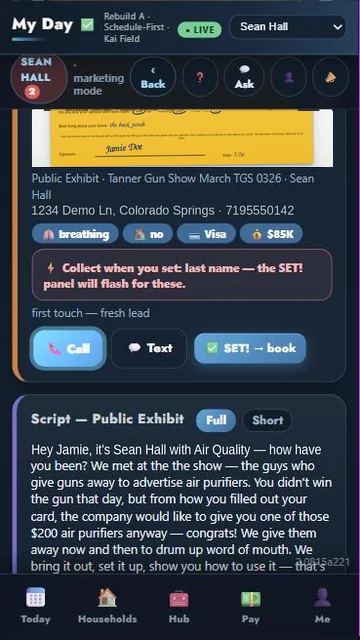
  3. Tap → Call

    Jamie Doe’s lead card with Call, Text and SET! book buttons, and the Public Exhibit script below

    Jamie’s card is up, the script is on screen, and the number is one tap. They say yes? Tap SET! and book it.
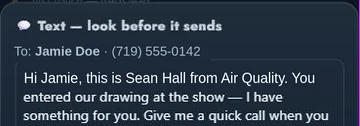
  4. Tap → Text

    Text, look before it sends: to Jamie Doe, (719) 555-0142, Hi Jamie, this is Sean Hall from Air Quality

    The text is already written, with Jamie’s name and yours in it. Look it over before it sends, then tap.

    Appointment → Reminder

    Book the demo from the call and it lands on the calendar. The day before, My Day reminds you to verify it.
  5. Referral → Follow-up

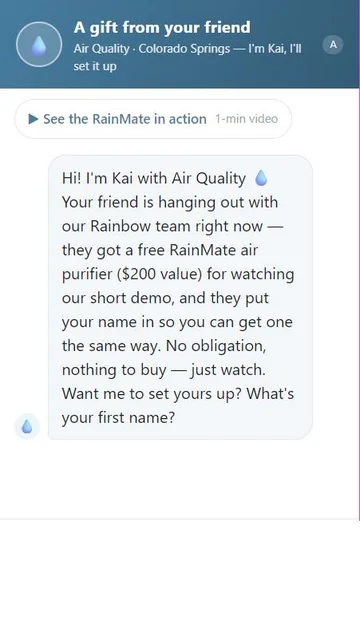
    InstyKai customer page: A gift from your friend, with Kai offering to set up the demo

    Your customer puts in a friend’s name, and the friend gets a gift page. InstyKai books the demo while you’re in another living room.
  6. Serial → Customer record

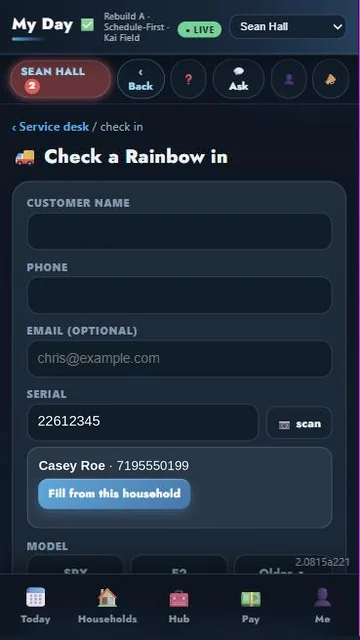
    Service desk, check a Rainbow in: serial 22612345 scanned, matched to Casey Roe, Fill from this household

    A Rainbow comes in for service. Scan the serial and it finds Casey Roe’s household. One tap fills in the check-in.
  7. Checklist → Correct process

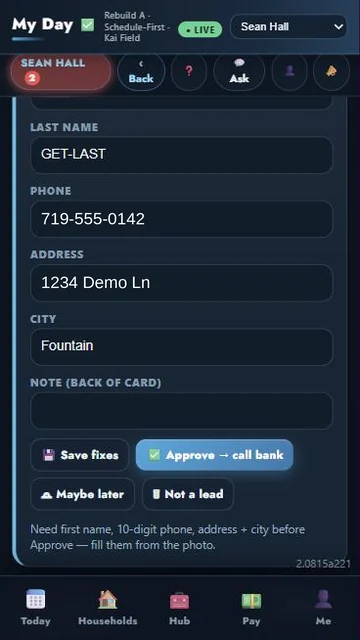
    The approve step: Save fixes, Approve to call bank, Maybe later and Not a lead buttons, over the note Need first name, 10-digit phone, address + city before Approve

    Approve needs a first name, 10-digit phone, address and city. Set a demo and the booking panel flashes what’s missing, like the last name.
  8. Question → Kai

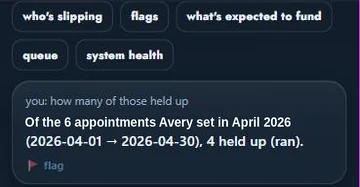
    Kai: quick chips for who’s slipping, flags, what’s expected to fund, and an answer about Avery’s April demos

    Ask Kai (preview) who’s slipping or what’s expected to fund. It answers straight from your records.

04 What you can now do

Six things your people get to do.

Everything below is in daily use at a working Rainbow office, except the two marked preview and testing.

Capture it.

  • Photograph a handwritten lead; OCR reads it
  • A person approves before the pipeline
  • Regi cards, referral sheets, show slips
  • Service photos at intake

Work it.

  • My Day: your whole day, one screen
  • RAPID: same power, fewer words
  • Call blocks you green-light
  • Active calling, script on screen
  • One-tap texts, customer details filled in
  • Checklists inside the step you’re on

Remember it.

  • Demos set right from the call
  • Reminders to verify tomorrow’s demos
  • Every household pinned on a map
  • Regi map: where, when, who
  • Inventory tracked by serial
  • Pay that tracks itself

Sell it.

  • Scripts inside the call screen
  • Customer pages with QR codes
  • Cost of a Clean Home calculator
  • Referrals, every one tracked
  • InstyKai books demos by chat
  • Guru coaching from recorded demos testing

Serve it.

  • Service desk from check-in to receipt
  • Scan the serial, match the customer
  • A helper for basic diagnosis
  • An approval link the customer taps
  • Paperwork signed on the phone
  • E-signatures, in person or emailed

Grow it.

  • Hand a call block to a teammate
  • Reps see their own; leaders see all
  • Ask Kai who’s slipping preview

05 The big idea

AI has made impressive demos cheap. Making them work is hard.

We build the machinery that works when the demo is over.

Anyone can make a prototype shine in an afternoon. Tuesday brings smudged handwriting, a card with no last name, a new rep alone at 7 pm. We build for Tuesday.

06 The human

Let the machine remember. Let the human think.

The goal isn’t to work less. It’s to waste less of your work. The app takes the retyping, the remembering and the hunting.

What the machine remembers

  • Tomorrow’s demos to verify
  • Who to call next
  • Which referral came from whom
  • Every serial, every household
  • Where everyone’s pay stands
  • What each lead still needs

What the human gets to do

  • Talking to customers
  • Selling the demo
  • Serving the household
  • Leading the team
  • Solving the exceptions
  • Building the business

Let the software carry the lists, the reminders and the paperwork. You go do the damn thing.

07 The owner’s view

Grow without turning growth into another bottleneck.

When the business remembers, the owner stops being the memory.

Find out Monday, not Friday.

Who’s calling, what’s set, what’s verified, what’s in for service. Each rep sees their own; you see the team’s. You stop finding out Friday what went wrong Monday.

Stop running on memory.

Follow-ups, verifications, serials and referrals live in the system, not in your head or a rep’s pocket. When someone leaves, their leads don’t leave with them.

No paper chase. No pay spreadsheet.

Paperwork gets signed on the phone. Pay tracks itself as demos and service are resulted. The five-minute chore turns into a few taps.

Room to add people.

A new dealer opens My Day and sees the next action. Training stops depending on shadowing you. Adding a dealer stops costing you your evenings.

You shouldn’t need a million-dollar software budget to operate like a serious company. This runs on the phones your dealers already carry.

Buy the pieces you need.

Every module stands on its own. Start with leads and calling, or the service desk, or the customer pages, and add the rest when you’re ready. Pay for what you use.

Tell Sean which pieces →

Want AI in your office?

Sean built this while running a Rainbow office, and he consults on AI for any kind of office: forms read from photos, booking by chat, the boring parts handled. Same rule as here: it has to work after the demo.

Ask about AI consulting →

08 The proof

This isn’t a concept.

  • Built inside a working Rainbow office in Colorado Springs.
  • Used every day for demos, service and running a team.
  • When something breaks, it gets fixed, usually within about a day.
  • People start using it without sitting through a training course.
  • Still evolving, and we say so: Kai is in preview, Guru is in testing.
  • Nothing on this site is an invented statistic or a made-up testimonial.

Sean runs his own demos and service on it, so he knows when something doesn’t work.

Engineer brain. Salesperson brain.

  • The engineer: the U.S. Navy interviewed Sean for nuclear test engineering work.
  • The salesperson: he once closed a $120,000 exterior installation in a single call.
  • He’s a former RGD, so he’s run the kind of office this page is for.
  • He built AQI Kai because he needed better machinery for his own operation.

The engineer wants the machinery to actually work. The salesperson wants it to disappear so he can sell. AQI Kai lives right there.

09 The covenant

How we work.

  1. Tell the truth.
  2. Build what we promise.
  3. Fix what breaks.
  4. Make the right thing easier.
  5. Respect the people doing the work.
  6. Keep moving.

If we say it, we intend to prove it. When something breaks, you’ll hear what happened and when it’ll be fixed.

10 The invitation

Welcome to the club.

You can finally work harder AND smarter.

See what Kai can do.

Ask for a demo of the demo software: a few videos, a walkthrough on your phone, or a call with Sean.

  1. Tell Sean who you are. It takes under 30 seconds.
  2. Sean answers personally, usually the same day.
  3. Pick your demo: videos, a walkthrough on your phone, or a call.
Talk to Sean →